
Features:

Input Realtime GPS data directly into Excel.
Adjustable loginterval.
Logs: Latitude, Longitude, Altitude, Speed, Heading, Date and Time
.
Updates are always free.


The license is flexible:

You are allowed to run GPStoEXCEL on as many computers as you whish, as long as you own the computers and you are the one using the software.

Minimum systems requirements:

Windows 98 / 2000 / ME / XP (Home/Pro) / Vista
Your computer must have a serial port.
GPS receiver with serial port.
Excel and VBA installed.


The User interface is easy to use
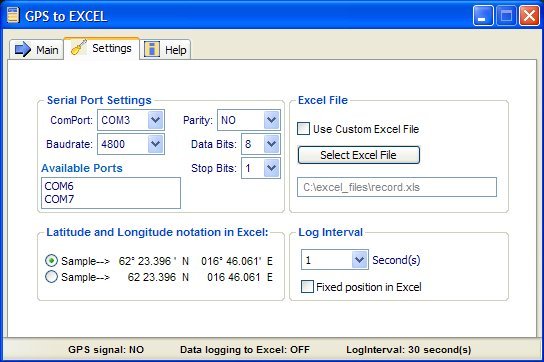
Select Comport, Baudrate and
other comport properties.


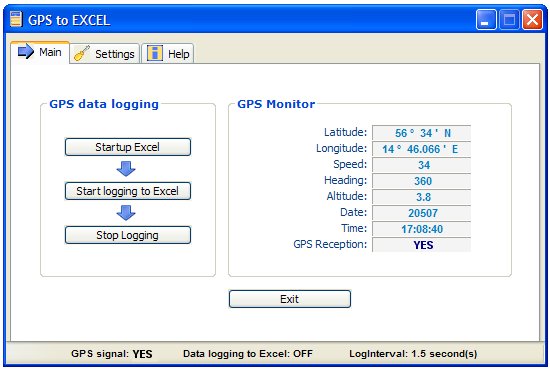
Click the button:
Startup Excel and then
Start logging to Excel
.


Important recommendation
If you are in the "logging process" (Excel is running) and you decide to shutdown Excel, then the recommended best practice is to also shutdown the GPS-to-EXCEL program, after you have exited Excel.


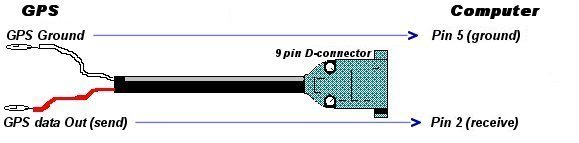
This shows how to connect your GPS receiver to your computer.